The Free Cashflow Spreadsheet Every Small Business Owner Needs
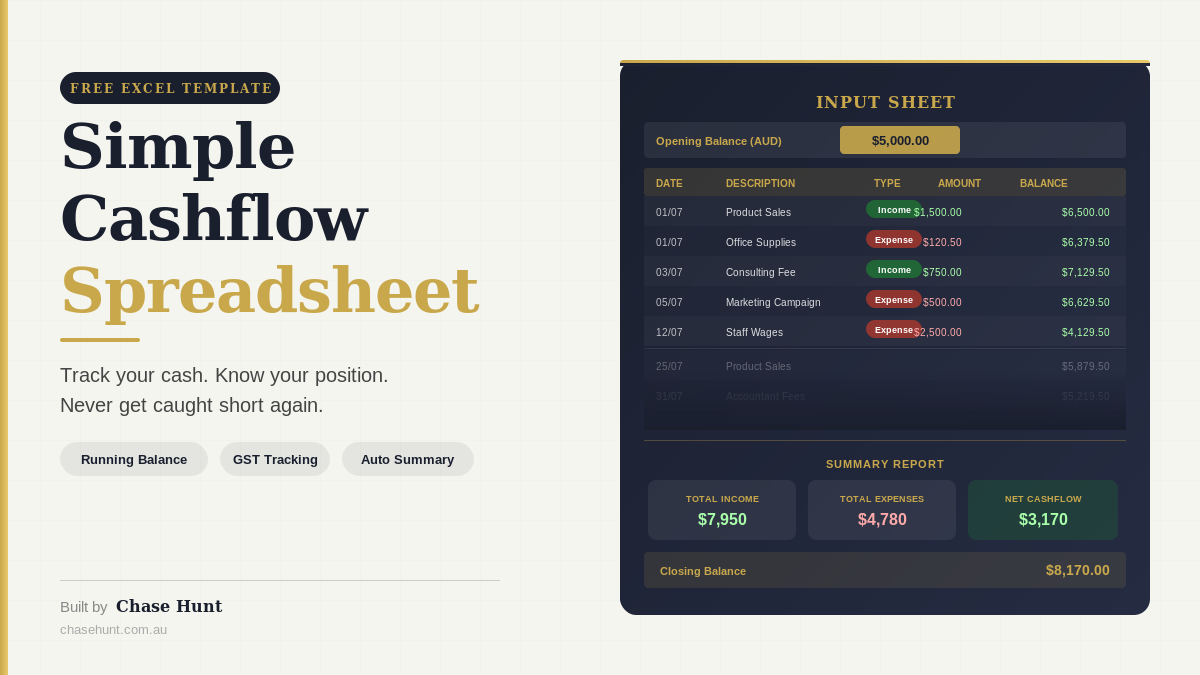
Most small business owners I work with care about their numbers. But no one has ever given them a simple, practical tool to track them.
Profit and loss reports from their accountant arrive weeks after the fact. Their bank balance tells them what happened but not why. And the idea of building something from scratch in Excel feels like a job for someone with a finance degree.
That's exactly why I built the Chase Hunt Simple Cashflow Spreadsheet. It's a free Excel template designed for small business owners who want to know where their cash stands right now, without needing an accounting background to use it.
Why Cashflow Is the Number That Actually Keeps Your Business Alive
You can have a profitable business on paper and still run out of cash. It happens more often than most people realise, and it's one of the most common reasons small businesses close their doors.
Profit is an accounting concept. Cash is what pays your wages, your rent, and your suppliers on Friday. The gap between the two is where businesses get into trouble.
A customer owes you $20,000 but hasn't paid yet. You still have to pay your team. That's a cashflow problem, not a profitability problem. And if you're not actively tracking your cash position, you often don't see it coming until it's too late to do anything about it.
Good cashflow management gives you visibility. It tells you what's coming in, what's going out, what's still outstanding, and whether you'll have enough in the bank next week to cover your commitments. That visibility is what lets you make good decisions instead of reactive ones.
What's Wrong with How Most Small Businesses Track Cash
The most common approach I see is the bank balance check. The owner logs into their banking app each morning, looks at the number, and decides how they feel about the day based on that figure.
The problem is that the bank balance is a lagging indicator. It tells you what already happened. It doesn't tell you that a $4,000 expense is coming out tomorrow, or that the invoice you sent two weeks ago still hasn't been paid and is now overdue.
Other business owners rely entirely on their bookkeeper or accountant. That's not a bad thing, but it means financial visibility arrives weeks after the fact and is filtered through someone else's interpretation. You're not in the driving seat.
A simple cashflow tracker changes that. You're recording transactions as they happen, you can see your running balance at any point, and you can spot a cash crunch forming well before it becomes a crisis.
What the Chase Hunt Simple Cashflow Spreadsheet Does
This is a free Excel template with three tabs: Instructions, Input Sheet, and Summary Report.
The Instructions tab walks you through setup in eight clear steps. There's no accounting jargon and no assumptions about what you already know.
The Input Sheet is where you log your transactions. Each row captures the date, a description, the category, whether it's income or expenses, the amount, how it was paid, whether GST applies, and the status (Received, Paid, or Due). You enter amounts as positive numbers and select Income or Expense from a dropdown. The spreadsheet automatically treats expenses as negative, so you never have to think about plus or minus signs.
The column that most people find most useful is the Running Balance. It updates automatically after every row and shows your real cash position at any point in time. If your balance drops below zero, the cell turns red. That's your early warning system.
At the top of the Input Sheet, you enter your Opening Balance. This is your bank account balance as at the date you start using the spreadsheet. Everything calculates from that figure, so your running balance always matches what's actually in your account.
The Summary Report tab pulls everything together automatically, with no manual refresh required. It shows your total income received, total expenses paid, net cashflow, and closing balance. It also breaks everything down by category so you can see exactly where your money is going, and includes a GST summary that estimates your GST collected, GST paid, and net GST position to help you stay on top of your BAS obligations.
Who This Tool Is Built For
This spreadsheet is designed for small business owners who are turning over anywhere between $300,000 and $5 million and want better visibility over their cash without adding complexity to their week.
It works well for service businesses, trades, retail, hospitality, and anyone who has a mix of income and outgoings they need to keep on top of. If you're already using accounting software like Xero or MYOB, this isn't a replacement for that. It's a practical day-to-day tool that sits alongside it and gives you something more immediate and visual to work with.
It's also useful for business owners who are working with a bookkeeper or accountant but want to understand their numbers more directly rather than waiting for monthly reports.
How to Set It Up in Under 10 Minutes
Getting started is straightforward.
Download the file and open it in Excel. On the Input Sheet, go to cell G2 and replace the sample opening balance with your actual bank balance as at today (or the start of whichever period you want to track).
Next, delete the sample data in rows 5 to 20. Just select those rows, right-click, and choose Delete Rows. The running balance and Summary Report will clear out and wait for your data.
Then start entering your transactions. Work through your bank statement row by row. Date, description, category (something consistent like "Sales Revenue" or "Wages"), type (Income or Expense from the dropdown), amount, payment method, GST included (Y or N), and status (Received, Paid, or Due).
That's it. As you add rows, the Running Balance column updates and the Summary Report fills in.
If you want to also capture upcoming transactions you know are coming, enter them with the Status set to "Due". They'll show in your running balance so you can see the impact of known future commitments before they hit your account.
A Note on the GST Summary
The GST section in the Summary Report is a rough estimate, not a formal BAS calculation. It takes any transaction where you've selected GST Included = Y and calculates 1/11th as the GST component.
It's a useful indicator that tells you approximately how much GST you've collected versus how much you've paid. But you should always confirm the figures with your accountant or bookkeeper before lodging your BAS. Tax obligations vary depending on your business structure and registrations, and this tool isn't a substitute for professional advice on those.
Frequently Asked Questions
Do I need to know Excel to use this? No. The spreadsheet is designed for people who aren't Excel experts. All the formulas are built in, the dropdowns do the work, and the instructions explain every step. If you can type into a cell and select from a list, you have everything you need.
Will this work in Google Sheets? The spreadsheet is built and tested in Excel. If you open it in Google Sheets it will generally work, but some formatting and dropdown behaviour may look slightly different. For the best experience, use it in Excel (including the free Excel web app through Microsoft 365).
Does it replace my accounting software? No, and it's not trying to. Tools like Xero and MYOB serve a different purpose, particularly around invoicing, payroll, and formal reporting. This spreadsheet is a day-to-day visibility tool that complements your accounting setup rather than replacing it.
How often should I update it? The more regularly you update it, the more useful it becomes. Many business owners find that a quick weekly update works well, working through the bank statement from the past seven days. Some prefer to log transactions as they happen. Either approach works.
Can I add my own categories? Yes. The categories column is free text, so you can use whatever naming makes sense for your business. The Summary Report is set up with the categories from the sample data, but you can adjust those category rows to match whatever you're using. Just keep your category names consistent across all rows so the formulas group them correctly.
Is this actually free? Yes, completely free. No email sign-up, no trial period, no credit card. Download it, use it, keep it.
What if my running balance doesn't match my bank balance? This usually means either the opening balance wasn't set correctly, or there's a transaction missing (or entered with the wrong amount). Work backwards from the last date your balance matched and check each row from there. The transaction log makes it straightforward to find where the gap is.
Download the Spreadsheet
The Chase Hunt Simple Cashflow Spreadsheet is free to download and keep. Click the link below and you'll get your own copy of the Excel file.
If you find it useful and want help thinking through how to use it as part of a broader financial system for your business, that's exactly the kind of work we do at Chase Hunt. You can get in touch at michael@chasehunt.com.au or visit chasehunt.com.au to find out more.
