|
Stage |
Probability |
What it means |
|---|---|---|
|
Initial Contact |
10% |
First contact made, no qualification yet |
|
Qualified |
25% |
Confirmed genuine need and budget |
|
Proposal Sent |
50% |
Formal proposal or quote delivered |
|
Negotiating |
75% |
Active negotiation on terms or pricing |
|
Verbal Yes |
90% |
Agreed verbally — paperwork pending |
Free Sales Pipeline Tracker for Small Business
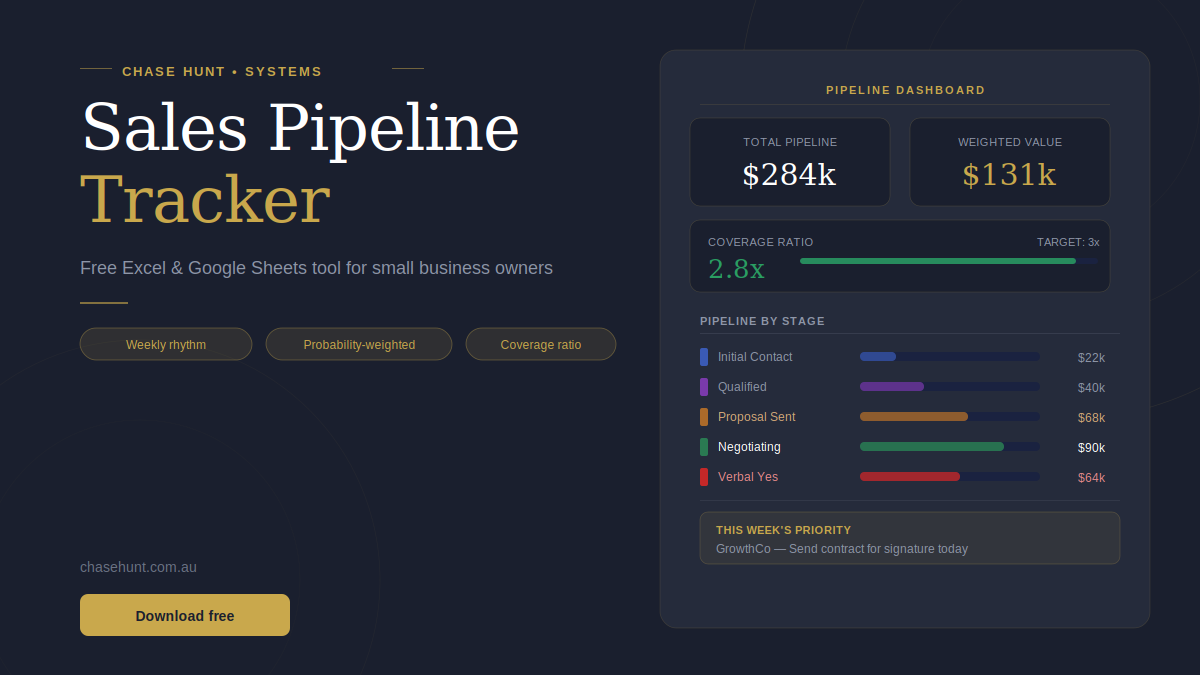
Most small business owners are not losing deals because they are bad at sales. They are losing deals because they cannot see what is happening across their pipeline at any given moment. One lead falls through the cracks because there was no next action logged. Another sits at 'Proposal Sent' for three weeks because no one followed up. A month ends short of target, and the owner has no clear answer for why.
A sales pipeline tracker can fix this. It's not a CRM with a six-month implementation, nor is it a complicated sales methodology. It is just a clear, structured view of every active opportunity, updated weekly, benchmarked against a real revenue target.
The Chase Hunt Sales Pipeline Tracker is a free Excel workbook built for small business owners who want professional pipeline visibility without the overhead of enterprise software.
What the tracker does
The tracker is built around four sheets, each with a specific job.
Settings is where you enter your four key numbers: monthly revenue target, average deal value, typical close rate, and average sales cycle length. These become the benchmark that every other metric is measured against. You set them once and rarely need to touch them again.
Pipeline is your working sheet. One row per deal. You enter the deal name, company, stage, owner, deal value, deal type, next action, and due date. Three columns — Annual Value, Days Open, and Weighted Value — calculate automatically so you never have to do the maths yourself.
Dashboard is your weekly view. It shows your four headline numbers (total pipeline, weighted pipeline, coverage ratio, and active deals), a full stage breakdown, and a priority table that surfaces your most advanced deals automatically. Open it every Monday morning. It takes about five minutes to read and tells you exactly where to focus your week.
How To Use is a plain-English reference covering the weekly rhythm, how to enter different deal types, and what each pipeline stage means.
Once-off, monthly recurring, and annual recurring deals
One of the most common sources of confusion in pipeline tracking is how to enter deals of different types. The tracker handles this clearly.
For a once-off project or job, enter the full fee in the Deal Value column. A $20,000 brand project goes in as $20,000.
For a monthly recurring deal such as a retainer or subscription, enter the monthly amount. The Annual Value column multiplies it by 12 automatically. A $3,500 per month retainer goes in as $3,500 — the tracker shows $42,000 as its annual contribution to your pipeline. This matters because the coverage ratio and weighted pipeline both use Annual Value, so a recurring deal is weighted correctly against your revenue target.
For an annual recurring deal such as a software licence or annual contract, enter the full annual value. A $24,000 per year contract goes in as $24,000.
This distinction matters more than most owners realise. A $3,500 per month retainer and a $42,000 once-off project are worth exactly the same to your business over a year. The tracker treats them that way.
Pipeline stages and probability weighting
Each deal is assigned to one of five active stages, each with a default probability built in.
There are also Closed Won (100%) and Closed Lost (0%) stages for marking completed deals.
The Weighted Value column multiplies each deal's Annual Value by its stage probability. This gives you a realistic, probability-adjusted view of your pipeline rather than an optimistic total that assumes everything closes.
What is a healthy pipeline coverage ratio?
Coverage ratio is the most important number in the tracker. It is calculated as Total Active Pipeline divided by your Monthly Revenue Target.
A ratio of 3x or above means you have three times your target in active opportunities. This is the minimum for reliable forecasting. Deals fall through, timelines slip, and close rates are never perfect — a 3x pipeline gives you enough buffer to hit your number even when things do not go exactly to plan.
A ratio between 1.5x and 3x means you have a building pipeline. It is not a crisis, but it should prompt consistent lead generation activity.
A ratio below 1.5x means your pipeline is thin. Lead generation becomes your single highest priority. This is the number that most business owners do not see clearly until a month ends short of target — and by then it is too late to do anything about it.
The tracker shows your coverage ratio in real time, updated as you add and progress deals.
Who this is for
The tracker is built for small business owners who are managing their own sales process or a small team doing the same. It works well for service businesses, trades and professional services, product businesses with a direct sales component, and SaaS or subscription businesses tracking recurring revenue.
It is not a CRM. It does not manage contacts, log call histories, or send automated emails. It is a visibility tool — a clear, weekly picture of where your revenue is coming from and what you need to do to hit your target.
If you have fewer than 100 active deals at any time, this tracker will serve you well. If you are managing a larger volume than that, the underlying logic still applies — you may just want a CRM with the same principles built in.
Limitations
The tracker uses static stage probabilities (10%, 25%, 50%, 75%, 90%) that may not match your actual conversion rates at each stage. If your business has significantly different conversion patterns — for example, a very high close rate on proposals sent — you can adjust the probability multipliers in the Weighted Value column formulas directly.
The tracker does not account for deal timing within the month. A deal at Verbal Yes that is expected to close in three months contributes the same to this month's weighted pipeline as one closing this week. For more precise monthly forecasting, add a target close date column and filter by it.
The coverage ratio benchmarks (3x strong, 1.5x building) are appropriate for most service and product businesses. Businesses with very long sales cycles — twelve months or more — may want to set their own benchmarks based on historical conversion data.
Download the free tracker
The Chase Hunt Sales Pipeline Tracker is free to download. It works in Microsoft Excel.
Open the Settings sheet first. Enter your four numbers. Add your active deals. Check the Dashboard on Monday morning.
If you want help building the sales system around it — the process, the cadence, the accountability structure — that is what Chase Hunt does. Book a free discovery call to talk through what your pipeline needs.
Frequently Asked Questions
- Do I need to know Excel to use this? No. The formulas are all pre-built. You only need to enter data in the coloured input cells — everything else calculates automatically. If you are using Google Sheets, upload the .xlsx file directly and it will work without any changes.
- Can more than one person use the tracker at the same time? Yes, if you upload it to Google Sheets and share it with your team. Multiple people can add and update deals simultaneously. For Excel, you would need to use a shared network location or OneDrive.
- How do I handle a deal where the value is not yet confirmed? Add the deal at your best estimate and note it in the Notes column. It is better to have an approximate number in the pipeline than to exclude it entirely. Update the value when it is confirmed.
- What should I do when a deal closes? Change the Stage to Closed Won. The deal will be removed from your active pipeline calculations but remain in the sheet for record-keeping. If a deal does not proceed, mark it Closed Lost for the same reason.
- Can I add more stages? Yes, but you will need to update the Weighted Value formula in column M to include the new stage name and assign it a probability. The stage dropdown validation in column E can be updated by going to Data > Data Validation.
- How is weighted pipeline different from total pipeline? Total pipeline is the sum of all active deal values. Weighted pipeline multiplies each deal by its stage probability — so a $50,000 deal at Proposal Sent (50%) contributes $25,000 to weighted pipeline. Weighted pipeline is a more realistic estimate of what will actually close, but both numbers are useful.
- Should I include very early-stage or speculative leads? Yes. Add them at Initial Contact (10% probability), which means they contribute very little to your weighted pipeline but are visible in your total. This keeps your coverage ratio honest and ensures you do not lose track of early conversations.
This tool is part of the Chase Hunt Business Operating System — a free suite of tools for small business owners. Explore the full suite at chasehunt.com.au.
